How to Fix ILS Not Picking Up Items From DSP Local Storage
Your Interstellar Logistics Station has local storage items but drones won't pick them up? Here is the exact slot configuration and filter fix.
You have 2,000 iron ingots sitting inside the ILS storage. The drones are idle. Nothing is moving. Your factory downstream is starving. This is the most common ILS troubleshooting issue in DSP. For a complete walkthrough of ILS settings including remote/local supply and demand, check our ILS Setup Guide.
Open the ILS panel. Set the slot to Supply (not Storage). Remote Demand set to 0. Local Demand set to 0 or your target. Drones will now pick up from this station.
The golden rule: "Supply" means drones can TAKE items out. "Storage" means items just sit there.
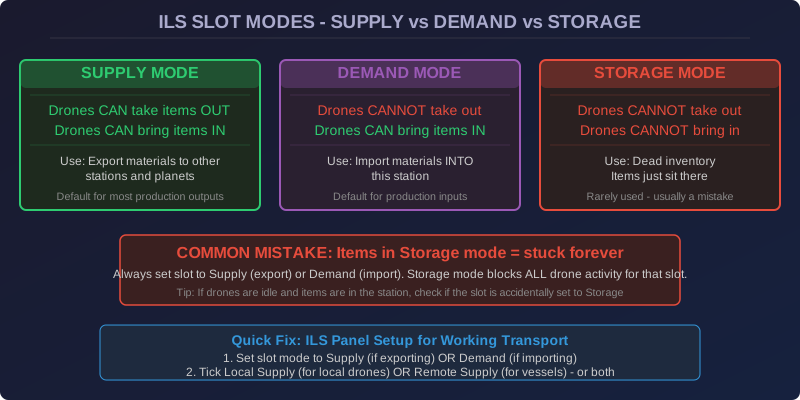
The #1 Culprit: Slot Mode Mismatch
The ILS has three slot states per item type: Supply, Demand, and Storage. These are NOT the same as the station-level "Local Supply / Local Demand / Remote Supply / Remote Demand" settings. They are per-slot behaviors that many players confuse.
Here is what each one actually does:
| Slot Mode | Drones Can Take Items Out | Drones Can Bring Items In | Use Case |
|---|---|---|---|
| Supply | ✅ Yes | Yes (if remote demand is set) | Export extra ingots to other planets |
| Demand | ❌ No | Yes | Import rare materials from other planets |
| Storage | ❌ No | No | Dead inventory that goes nowhere |
The Remote vs Local Settings Trap
Even with the slot set to Supply, your drones may still refuse to move. The second most common mistake: confusing the Remote and Local settings.
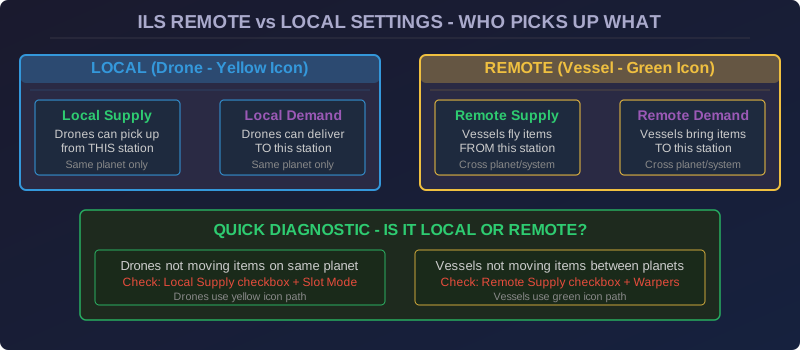
Here is the matrix of what drones actually check:
- Local drones (yellow icon): check "Local Supply/Demand" settings only
- Remote drones (green icon): check "Remote Supply/Demand" settings only
- Slot mode must be set correctly for both types to work
1. Slot mode = Supply?
2. Local Supply checkbox ticked (for local drones to pick up)?
3. Remote Supply checkbox ticked (for remote drones to pick up)?
4. There is actually a drone in the station? (Drones are crafted separately)
5. The destination ILS has Demand mode + Remote Demand ticked?
The Drone Station Assignment
Another hidden issue: drones in DSP are assigned to a specific ILS station. If you placed a new ILS and didn't put new drones in it, the drones from your other station won't fly over to help. Each ILS needs its own fleet of drones assigned to it.
Check the drone count in the ILS panel. If it shows 0/10, you need to craft more logistics drones and insert them directly into this station's drone slot.
Practical Example: Cross-Planet Iron Supply
- Mining planet: ILS set with iron ingots in Supply, Remote Supply ticked
- Factory planet: ILS set with iron ingots in Demand, Remote Demand ticked
- Both stations have at least 2 drones and 1 vessel assigned
- Both stations have warpers (if cross-system)
- Vessels will auto-transport from Supply planet to Demand planet
This is the standard "two-ILS blueprint" that powers every interplanetary factory in late game. If you are building a distributed factory with multiple planets, our Factory Expansion Guide covers planet specialization and ILS-based scaling strategies up to 300 SPM.
One More Thing: Power Your ILS
An ILS without power is an ILS that does nothing. Drones and vessels consume power per trip. If your ILS shows the power icon as red/orange, check if your grid has enough capacity. An ILS draws 1-3 MW depending on activity.