How to Prevent DSP Logistic Drone Congestion at ILS Station
Drones piling up at one ILS while others starve? Here is the fix using priority splitters, drone limits, and orbital buffer stations.
You have 200 drones orbiting a single ILS while three other stations sit empty. Items that should take 10 seconds to move take 5 minutes. Your factory is running at 30% because of logistics gridlock. Drone congestion is the hidden throughput killer of DSP. If your ILS vessels are not even taking off yet, start with our ILS Setup Guide to make sure your Supply/Demand configuration and warper slots are correct before troubleshooting drone distribution.
Cap your drones per ILS station (5-10 max), use priority splitters to balance material distribution, and add orbital buffer chests near high-traffic buildings.
The magic number: 8 drones per ILS station is the sweet spot for 95% of factory setups.
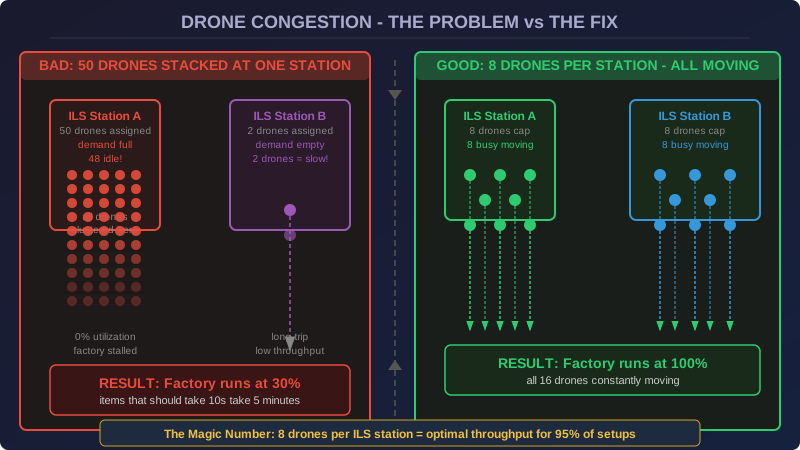
What Causes Drone Gridlock
The drone congestion problem is a classic tragedy of the commons in DSP's logistics system. Here is the chain reaction:
- Station A has 50 drones assigned
- Station A's demand fills up (buildings don't need items right now)
- All 50 drones from Station A return home and sit idle
- Station B needs items but only has 2 drones assigned
- Station B cannot move enough items, factory stalls
The game gives you no built-in load balancing for drones. Each ILS station has its own assigned drones, and they won't help other stations. The only way to prevent congestion is to design the system so no single station accumulates too many idle drones.
The Drone Cap Rule: 8 Maximum Per Station
| Station Type | Recommended Drones | Recommended Vessels | Notes |
|---|---|---|---|
| Mining Outpost | 8 | 5 | High throughput, single material |
| Smelting Column | 6 | 4 | Moderate throughput |
| Intermediate Production | 6 | 3 | Multi-material, lower volume |
| Science Hub | 10 | 6 | High traffic, multiple materials |
| Remote Mining Planet | 4 | 10 | Vessels do the work, drones just for belts |
Lower drone counts force stations to process items faster. A station with 50 drones will have 48 of them idle. A station with 8 drones will keep all 8 moving at all times. Less drones = more throughput per drone.
Priority Splitter Material Distribution
When you have multiple ILS stations requesting the same material (e.g., iron ingots), the default behavior is that the nearest supply ILS handles all requests. This creates a bottleneck at the closest supply station while distant supply stations sit full.
The fix: use priority splitters at the belt level to distribute incoming materials across multiple ILS receiving stations. Set your highest-throughput station as priority, and the overflow routes to secondary stations.
Orbital Buffer Chests: The Pro Solution
For high-traffic buildings like Research Labs or Fractionators, add a small buffer chest between the ILS output and the building input. This chest acts as a shock absorber: when the drone is delayed, your building pulls from the buffer instead of starving.
A single Mk.II Storage Box holds enough materials to run most production lines for 5-10 minutes without drone deliveries. This eliminates the production stutter caused by drone travel time.
When to Switch: Drones vs Belts
- Short distance + high volume: Belts win (4 belts = unlimited throughput)
- Long distance + low volume: Drones win (no belt cost, low latency)
- Cross-planet: ILS always (belts don't work between planets)
- Mixed material types: Drones win (sorting via belts is painful)
A good rule: use belts for high-volume base materials (iron, copper, coal) and drones for everything else.
When expanding to a multi-planet logistics network, drone congestion compounds across planetary systems. The Factory Expansion Guide covers how to design planet-specific ILS configurations that minimize cross-planet drone traffic.
Community Verification
Diagram updated 2026-06-10: SVG rebuilt to fix rendering on GitHub Pages.