DSP Blueprint Guide (v0.10) - Copy and Paste Entire Factories in Seconds
Complete blueprint guide for DSP v0.10. How to copy, paste, mirror, and share factory blueprints. Save hours of rebuilding.
DSP v0.10 added a proper blueprint system. No more hand-placing every smelter. Here is everything you need to know about blueprints - from basic copy-paste to advanced mirroring and sharing.
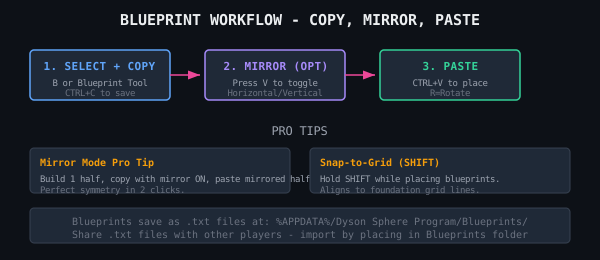
TL;DR: How Blueprints Work in DSP v0.10
Press B to open the Blueprint Library. Select buildings (hold shift to multi-select), press CTRL+C to copy, then CTRL+V to paste. That is the basic flow. This guide covers the details that are not in the game.
Basic Operations
Copying a Layout
Select the Blueprint Tool from your toolbar (or press B, then click the Copy button). Click and drag a selection box around the buildings you want to copy. The game highlights all selected buildings in green. Press CTRL+C.
Your new blueprint appears in the Blueprint Library. Name it. The blueprint stores:
- Building types and positions
- Conveyor belt paths and sorter connections
- Assembler recipes (if set)
- Logistics station slot configuration (if set)
- Power pole and substation placement
It does NOT store inserter filter settings, station vessel/drone counts, or power grid wiring. You must set these manually after pasting.
Pasting a Blueprint
Open the Blueprint Library (B), click your blueprint, and the ghost image follows your cursor. Press R to rotate. Move to the build location and click to confirm.
Buildings appear as ghosts. If you have the materials in your inventory, bots build them automatically. If not, bots wait for materials from logistics.
Pro Blueprint Techniques
Mirror Mode
Press V while holding a blueprint to toggle mirror mode. This flips the layout horizontally or vertically. Essential for building symmetrical smelting arrays or research lab setups. Mirror mode works both for copy and paste.
Pro tip: build one half of a symmetrical factory, copy it with mirror ON, and paste the mirrored copy next to the original. Perfectly symmetrical factory in two clicks.
Smart Paste Alignment
Hold SHIFT while positioning a blueprint to enable snap-to-grid mode. The blueprint snaps to the nearest foundation grid line. This ensures perfect spacing when building multiple copies side by side.
Combine snap-to-grid with conveyor belt alignment: belt the output of blueprint copy 1 into the input of copy 2. The factory scales without manual belt work between segments.
Blueprint Sharing (Save Files)
Blueprints save to your local machine. The Blueprint Library file is at:
Windows: %APPDATA%/Dyson Sphere Program/Blueprints/
Each blueprint is a single .txt file. You can:
- Share .txt files with other players (post on Reddit, Discord)
- Import blueprints from other players (place .txt in the Blueprints folder)
- Export your best layouts for community use
To import, paste the bluepront .txt file into the Blueprints folder and restart DSP. The new blueprint appears in your library.
Blueprint Recipes for Automation
Here are three essential blueprints every DSP player should save:
| Blueprint | Size | Use |
| Smelting Column (12 furnices) | 6x12 tiles | One belt iron ingots in, 120/min out |
| Research Lab Row (10 labs) | 4x16 tiles | Matrix automation with belt feed |
| Oil Refinery Block (4 refineries) | 8x12 tiles | Crude oil to refined oil + hydrogen |
Enable recipe in assemblers before copying to save recipe assignments in the blueprint. This saves time when pasting: assemblers come pre-configured.
Common Blueprint Mistakes
- Missing belts: Make sure all belts are connected before copying. Disconnected belts do not save.
- Too large: Blueprints over 50 buildings become hard to place. Break them into 20-30 building chunks.
- Sorter conflicts: Sorters set to specific items might not match after paste. Check sorter filters after placement.