DSP Belt Throughput & Piler Guide (v0.10) - 4x Your Belt Capacity Without Upgrading Belts
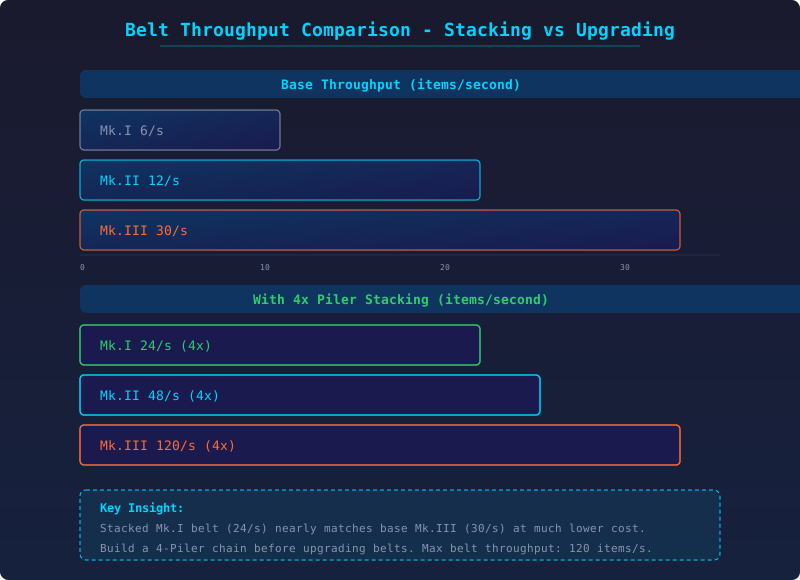
| Belt Tier | Base Throughput | 4-Stack Throughput | Upgrade to Same |
|---|---|---|---|
| Mk.I | 6 items/s | 24 items/s | Mk.III base |
| Mk.II | 12 items/s | 48 items/s | 4x Mk.III base |
| Mk.III | 30 items/s | 120 items/s | - |
A Mk.III belt moves 30 items per second. That sounds like a lot until your smelter array needs to push 120 ingots per second through a single line. Upgrading belts to Mk.III only gets you to 30. The solution is not a faster belt -- it is a tighter belt. Piler stacking quadruples throughput without replacing a single belt segment.
Here is the core throughput chart: Mk.I belt 6/s (base), 24/s (4-stack). Mk.II belt 12/s base, 48/s stacked. Mk.III belt 30/s base, 120/s stacked. The stacked throughput of a Mk.I belt exceeds the base throughput of a Mk.II. Stacking is always better than upgrading.
DSP Belt Throughput Comparison Chart (SVG): Bar chart showing base vs stacked throughput for Mk.I, Mk.II, Mk.III belts. 4x jump on each.
How Piler Stacking Actually Works
An Automatic Piler sits on a belt segment. Items approaching the Piler are compressed into stacks of 2, 3, or 4, depending on how many Pilers the items have passed through. Each Piler doubles the stack count, up to the hard cap of 4.
The belt's physical speed cap (30/s for Mk.III) still applies to belt segments. But since each "item" on the belt now represents a stack of items, the effective throughput is belt speed x stack count.
Key insight: the Piler does not make items move faster. It makes each slot carry more items. The distinction matters because Piler placement matters: place Pilers near production outputs, not near consumer inputs. Items should be stacked before they enter a long belt run or a sorter array.
DSP Piler Stack Progression (SVG): Four panels showing items on belt before Piler (1-stack), after Piler 1 (2-stack), after Piler 2 (4-stack). Circle visual representation.
Piler Chain Design: 2 Units Is Enough
Two Pilers in series produce 4-stack. A third Piler adds nothing because the stack cap is already reached. Always place exactly two Pilers in sequence for max stacking.
The spacing between Pilers matters: leave 2-3 belt tiles between Piler 1 and Piler 2. If they are too close, the first Piler does not finish stacking before the second Piler tries to process the items.
The Piler chain must be on a straight belt segment. Pilers do not function correctly on curved belts or at T-junctions.
Where Stacking Changes the Math
Fractionator loops benefit the most from stacking. A single Fractionator with unstacked hydrogen converts 0.3/s. With 4-stack hydrogen, that same machine converts 1.2/s. A loop of 30 Fractionators with stacking produces 36 Deuterium / second vs 9/s unstacked.
Smelter arrays are the second biggest beneficiary. A standard Smelting Array running 3 smelters per belt outputs 6 ingots/second from 3 converters. With 4-stack output belts, that single belt can carry 24 ingots/second, which supports 12 smelters instead of 3.
The bottleneck shifts from the belt to the sorter. A Mk.III sorter moves 30 items/second between belt and building. With 4-stack items, the sorter still processes 30 stacks per second, which represents 120 items per second. This means sorters are never the bottleneck when stacking is active.
DSP Smelting Array Throughput with Piler (SVG): Before and after comparison. 3 smelters per belt vs 12 smelters per belt with Piler stacking.
Processor and Science Output Belts
Processors are produced at a rate of roughly 0.5/s per Mk.III assembler. A row of 10 assemblers outputs 5/s -- well within Mk.III belt capacity unstacked. But when you connect that output to a central bus, the combined output of multiple rows exceeds 30/s quickly.
With a Piler on each assembler's output belt (or a shared Piler at the merge point), the belt capacity increases to 120/s effective. This covers dozens of assemblers on a single belt.
The same applies to Processor Factory output lines and science distribution belts in a White Science build.
Piler vs Logistics Drones
Stacking belts is not always the answer. When belt throughput exceeds roughly 30/s after stacking, consider switching to logistics for item transport. An ILS with drones handles high throughput without belt sprawl.
The threshold: if your belt run is longer than 100 tiles and requires more than 60/s throughput, use logistics. The belt cost (resources + build time) exceeds the ILS cost at that distance and volume.
The Logistics Drones vs Belts Guide has the full break-even analysis for different distances and throughputs.
Common Piler Mistakes
Mistake 1: Stacking after a belt merger. Merging two 4-stack belts produces a belt with items at 2-stack, because the merger cannot maintain 4-stack from two inputs. Always Pilers after mergers, not before.
Mistake 2: Stacking at a Splitter. A Splitter divides stacked items into 2-stack on each output, negating the Piler benefit. Place Pilers after Splitters, not before.
Mistake 3: Using three or four Pilers. Waste of resources. Two Pilers reach the 4-stack cap.
Mistake 4: Expecting Pilers to work with sorters. Sorters handle individual items, not stacks. If a sorter is pulling from a stacked belt, it pulls stacks one at a time, which is fine for throughput but confusing when you see the belt moving slow relative to production.
Sorter Throughput with Stacked Belts
When a sorter pulls from a stacked belt, it moves an entire stack (2-4 items) in one sorter cycle. This means a Mk.III sorter pulling from a 4-stack belt moves 120 items/second per sorter -- more than any individual building can consume.
Practical takeaway: you can connect multiple buildings to a single stacked belt segment using multiple sorters, and each building gets full throughput. No need for dedicated belts per building row.